<?xml version="1.0" encoding="utf-8"?><feed xmlns="http://www.w3.org/2005/Atom" ><generator uri="https://jekyllrb.com/" version="3.10.0">Jekyll</generator><link href="https://daniel-guooo.github.io/feed.xml" rel="self" type="application/atom+xml" /><link href="https://daniel-guooo.github.io/" rel="alternate" type="text/html" /><updated>2026-04-30T03:47:13+00:00</updated><id>https://daniel-guooo.github.io/feed.xml</id><title type="html">Daniel Guo</title><subtitle>Daniel Guo&apos;s personal website for research, projects, and professional work in AI and software engineering.</subtitle><author><name>Daniel Guo</name><email>zg2379@nyu.edu</email></author><entry><title type="html">The First Time I Tried ChatGPT Images 2.0, I Realized…</title><link href="https://daniel-guooo.github.io/blog/the-first-time-i-tried-chatgpt-images-2-0-i-realized/" rel="alternate" type="text/html" title="The First Time I Tried ChatGPT Images 2.0, I Realized…" /><published>2026-04-27T00:00:00+00:00</published><updated>2026-04-27T00:00:00+00:00</updated><id>https://daniel-guooo.github.io/blog/the-first-time-i-tried-chatgpt-images-2-0-i-realized</id><content type="html" xml:base="https://daniel-guooo.github.io/blog/the-first-time-i-tried-chatgpt-images-2-0-i-realized/"><![CDATA[<p>Source: <a href="https://openai.com/index/introducing-chatgpt-images-2-0/">Introducing ChatGPT Images 2.0</a>, OpenAI</p>

<h2 id="the-feeling-that-changed">The Feeling That Changed</h2>

<p>The first time I tried ChatGPT Images 2.0, the thing that surprised me was not simply that the images looked better.</p>

<p>They did look better. But that was not the part that changed how I thought about it.</p>

<p>The more interesting feeling was that image generation had started to behave less like a magic box and more like a visual workflow. I was not just writing one prompt, waiting for one result, and deciding whether the model had succeeded or failed. I was having a back-and-forth with a system that could understand a visual goal, make a reasonable first attempt, accept corrections, and move closer to something usable.</p>

<h2 id="the-old-problem-pretty-but-hard-to-trust">The Old Problem: Pretty, But Hard To Trust</h2>

<p>For a long time, my relationship with image models was basically this: they were impressive, but unreliable. I could use them for inspiration, mood boards, strange concept art, or a quick visual joke. But whenever I needed something close to a real design asset, the experience became fragile.</p>

<p>The image might look good at a glance, but the details would fall apart. Text would become decorative noise. A poster title would have extra letters. A sign would look almost readable, which somehow made it worse. If I asked for a product mockup, the object might be beautiful, but the label would be nonsense. If I asked for one specific edit, the model might redraw everything around it.</p>

<p>The frustrating part was not that the model could not generate pretty images. It could. The frustrating part was that it was hard to trust.</p>

<p>There is a big difference between “this image is impressive” and “I can use this image in a workflow.” The second one requires more than aesthetic quality. It requires readable text, reliable edits, consistency, and enough control that a user can move from an idea toward a deliverable without starting over every time.</p>

<h2 id="what-felt-different-this-time">What Felt Different This Time</h2>

<p>After playing with it for a while, I do not think the improvement is one single thing. It is a cluster of smaller changes that add up to a different experience:</p>

<ul>
  <li>text is closer to real design use</li>
  <li>editing feels iterative instead of one-shot</li>
  <li>consistency across related images is more believable</li>
  <li>the output feels more production-shaped</li>
</ul>

<h3 id="text-is-no-longer-just-texture">Text Is No Longer Just Texture</h3>

<p>Text has always been one of the easiest ways to tell whether an image model is actually useful for real design tasks. A fantasy landscape can hide many errors. A poster cannot. A slide cover cannot. A product label cannot. A menu, an infographic, a UI mockup, or an ad layout cannot. In those cases, letters are not decoration. They are part of the object.</p>

<p>With older image models, text often felt like a trap. The model understood that something should look like text, but not that the text had to be text. The output felt like a sketch of a design rather than a design draft.</p>

<p>ChatGPT Images 2.0 feels meaningfully different here. It is not perfect, and I would still check every generated word before using it anywhere serious. But the gap between “pretty but unusable” and “rough draft I can actually evaluate” feels much smaller. Dense text, poster titles, layout-heavy images, notes, and multilingual scenes are no longer automatically doomed.</p>

<h3 id="iteration-matters-more-than-one-perfect-prompt">Iteration Matters More Than One Perfect Prompt</h3>

<p>This may be the more important change. Image generation used to feel too much like prompt gambling. You wrote a prompt, got a result, then rewrote the prompt and hoped the next result would be closer. If the image was 80 percent right, that was almost annoying, because fixing the last 20 percent often meant risking the whole image.</p>

<p>The new experience feels closer to working with a designer or art director, even if that comparison is still imperfect. You can say: keep this composition, change the headline, make the background cleaner, adjust the color palette, remove this object, make the product larger, keep the style but generate a vertical version.</p>

<p>The important part is not that every edit lands perfectly. The important part is that the interface encourages revision instead of replacement.</p>

<p>That changes how I prompt. When a model is a one-shot generator, I try to pack everything into the first prompt. But when the model supports a real editing loop, the first prompt can be a direction, not a final contract. I can let the image appear, react to it, and then refine it.</p>

<h3 id="consistency-turns-images-into-assets">Consistency Turns Images Into Assets</h3>

<p>One image is easy to admire. A set of related images is much harder to make useful. If I am making a campaign, a carousel, a product series, or a sequence of scenes, I do not only care whether each image looks good. I care whether they belong together.</p>

<p>ChatGPT Images 2.0 seems better suited for this kind of multi-image thinking. It feels less like asking for isolated pictures and more like asking for a visual system. That does not mean it solves brand consistency or production art direction. It does not. But it moves the model closer to the kind of asset generation actual teams need: variations, adaptations, sequences, and reusable visual directions.</p>

<h3 id="it-feels-more-production-shaped">It Feels More Production-Shaped</h3>

<p>I am careful with the word “production” because generated images still need review, taste, and often post-processing. But there is a difference between a toy and a tool. A toy produces surprising outputs. A tool helps you finish a job.</p>

<p>The practical improvements around format, size, quality, reference images, and editing make the model feel more like something that can participate in real work. I can imagine using it for ad concepts, e-commerce mockups, social posts, slide covers, internal prototypes, blog visuals, thumbnails, and early creative exploration.</p>

<p>Not as a final authority, but as a fast collaborator in the messy middle between idea and finished asset.</p>

<h2 id="still-not-magic">Still Not Magic</h2>

<p>The biggest limitation is that the output is still mostly an image, not an editable design file. If I want to move a text box by four pixels, change a font weight, adjust a layout grid, or hand off layered assets to a designer, I still want tools like Figma, Photoshop, Illustrator, or some structured design environment. A generated PNG is not the same thing as a production design file.</p>

<p>Language is another limitation. English text may be better, but multilingual text can still be uneven. Even when the words are correct, typography is a separate skill. Good text rendering is not the same as good graphic design.</p>

<p>But those limitations do not make the progress less interesting. They make the direction clearer.</p>

<h2 id="my-takeaway">My Takeaway</h2>

<p>The important shift is not that ChatGPT Images 2.0 is suddenly the final stop for visual production. It is that image generation is starting to become an interactive workspace.</p>

<p>It is moving from “make me a picture” toward “help me develop this visual idea.”</p>

<p>After trying it, my conclusion is simple: the model is not merely getting better at drawing.</p>

<p>It is getting better at staying with the user through the process of making something visual.</p>

<h2 id="a-few-test-outputs">A Few Test Outputs</h2>

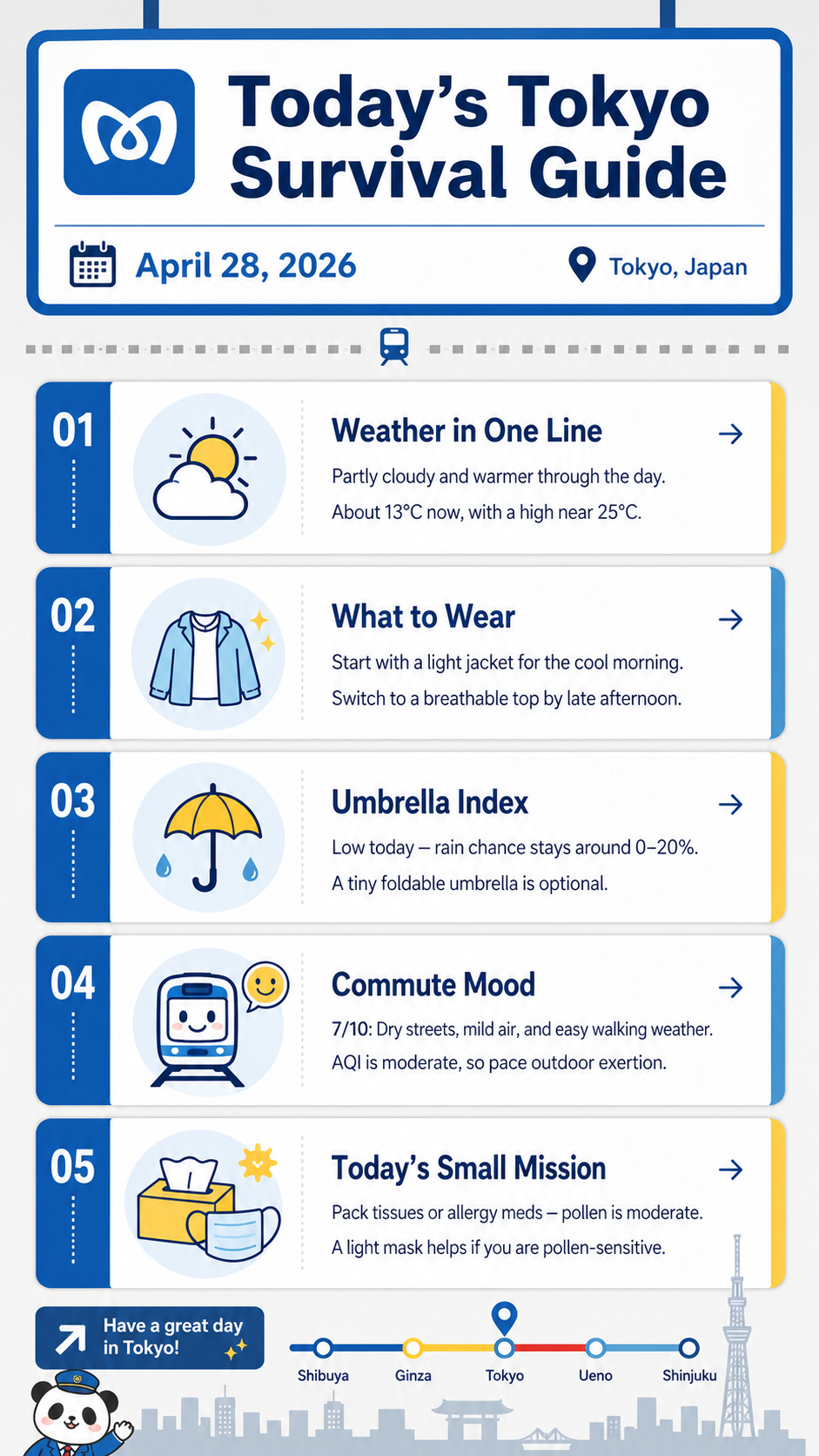
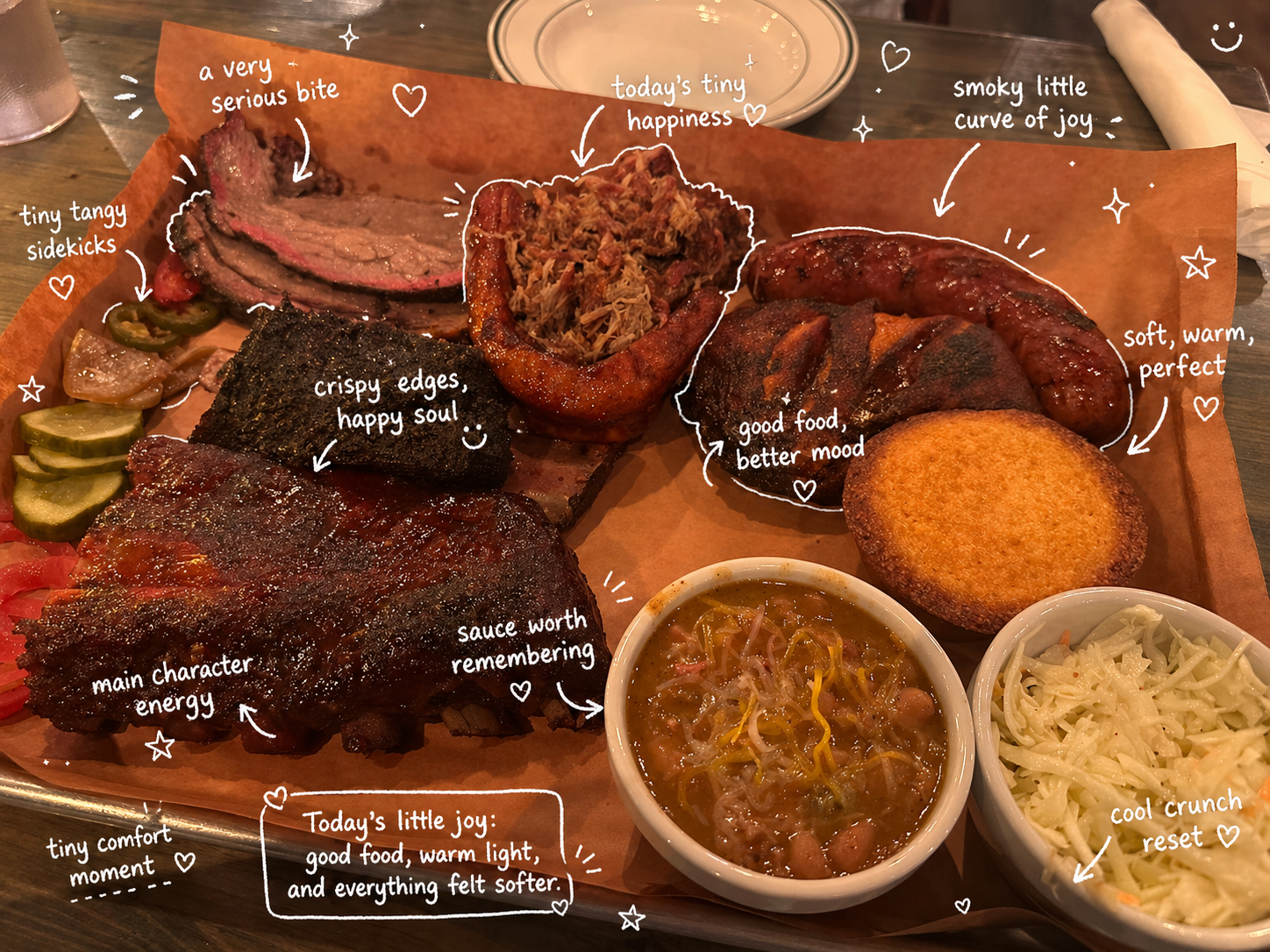
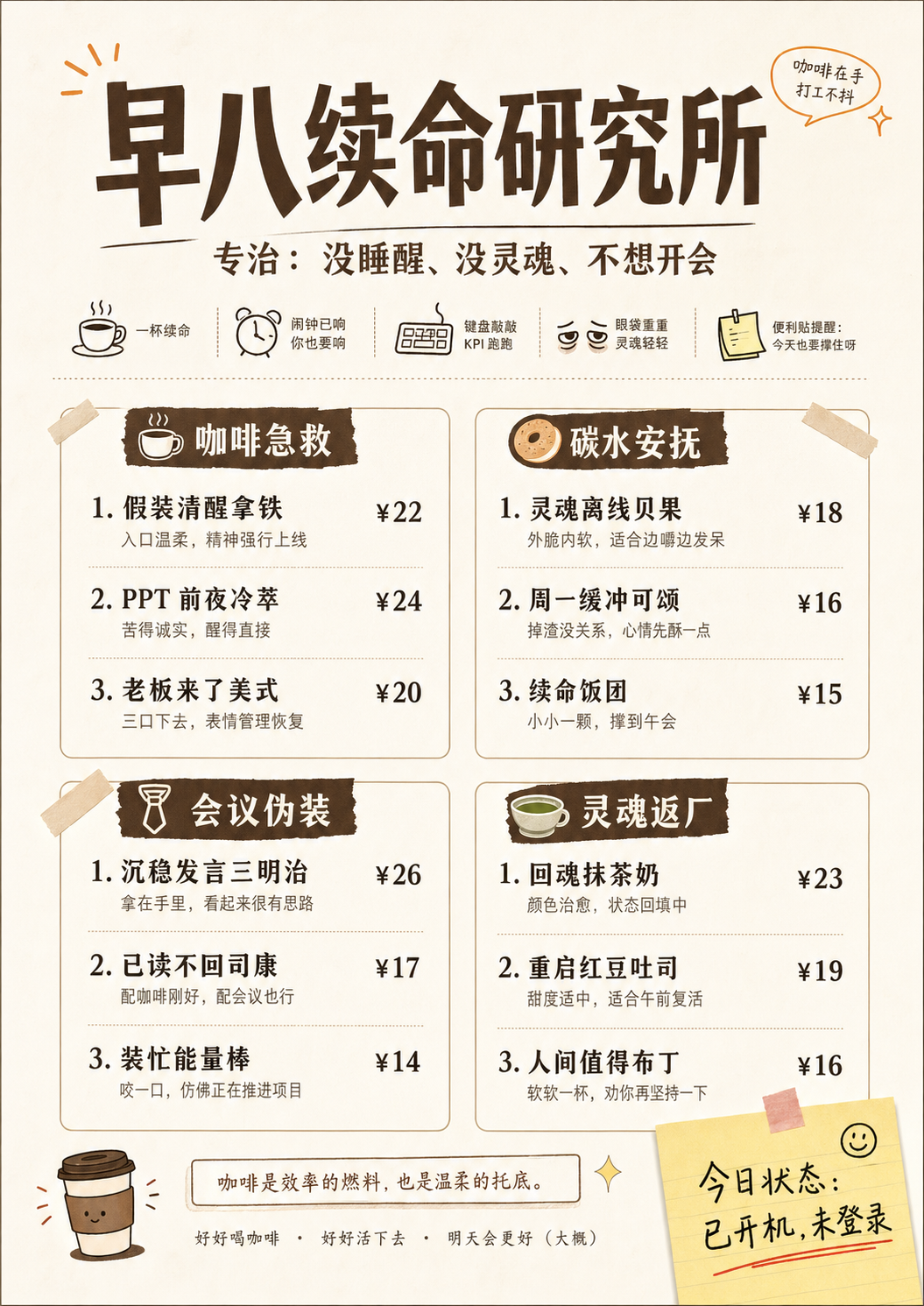
<p>Here are a few outputs I used to think through the points above. I am not including them as final polished design work. Each one is here because it shows a different part of the workflow that felt meaningfully different.</p>

<p>One thing I wanted to test was what happens when image generation is connected to web search. Instead of generating only from a static prompt, the model can use external context to make the visual more grounded. This matters for images that depend on current events, products, places, or facts that may not be fully contained in the prompt.</p>

<figure>
  <img src="/images/blog/chatgpt-images-2/web_search.png" alt="A ChatGPT Images 2.0 test output using web search as part of the image generation workflow" />
  <figcaption>Web search makes the image workflow feel less isolated from current context.</figcaption>
</figure>

<p>I also wanted to see how well it could follow a specific visual direction. The interesting part is not only whether the image looks good, but whether the model can hold onto composition, mood, layout, and the feeling of a particular kind of image. That is where it starts to feel closer to design iteration than generic image generation.</p>

<figure>
  <img src="/images/blog/chatgpt-images-2/ins_style_image.png" alt="A ChatGPT Images 2.0 test output showing instruction following and visual style control" />
  <figcaption>Instruction following matters most when the goal is a specific visual style, not just a pretty image.</figcaption>
</figure>

<p>Consistency was another thing I cared about. For real use, one nice image is often not enough. You may need several images that feel like they belong to the same campaign, product line, or story world. This example points to that shift from isolated image generation toward reusable visual assets.</p>

<figure>
  <img src="/images/blog/chatgpt-images-2/consistency.jpg" alt="A ChatGPT Images 2.0 test output showing visual consistency across related assets" />
  <figcaption>Consistency is what starts turning individual images into a reusable asset set.</figcaption>
</figure>

<p>The text-heavy example is the one I would inspect most carefully, because text is where image models historically failed in very obvious ways. But it is also the example that best shows why the update feels different: the model is not only drawing letters, it is trying to preserve readable meaning across layout and language.</p>

<figure>
  <img src="/images/blog/chatgpt-images-2/complex_text.png" alt="A ChatGPT Images 2.0 test output with complex text rendering" />
  <figcaption>Complex text and multilingual content are still worth checking carefully, but they no longer feel automatically unusable.</figcaption>
</figure>]]></content><author><name>Daniel Guo</name><email>zg2379@nyu.edu</email></author><summary type="html"><![CDATA[Source: Introducing ChatGPT Images 2.0, OpenAI]]></summary></entry><entry><title type="html">A Harness Is a Hypothesis About What the Model Cannot Do Yet</title><link href="https://daniel-guooo.github.io/blog/a-harness-is-a-hypothesis-about-what-the-model-cannot-do-yet/" rel="alternate" type="text/html" title="A Harness Is a Hypothesis About What the Model Cannot Do Yet" /><published>2026-03-27T00:00:00+00:00</published><updated>2026-03-27T00:00:00+00:00</updated><id>https://daniel-guooo.github.io/blog/a-harness-is-a-hypothesis-about-what-the-model-cannot-do-yet</id><content type="html" xml:base="https://daniel-guooo.github.io/blog/a-harness-is-a-hypothesis-about-what-the-model-cannot-do-yet/"><![CDATA[<p>Source: <a href="https://www.anthropic.com/engineering/harness-design-long-running-apps">Harness design for long-running application development</a>, Anthropic</p>

<h2 id="a-five-sentence-summary-by-gpt-54">A Five-Sentence Summary, by GPT-5.4</h2>

<p>Anthropic describes a harness for pushing Claude beyond naive long-running coding by combining task decomposition, explicit evaluation, and model-specific context management. The post starts from two recurring failure modes: agents lose coherence as context grows, and they are too generous when grading their own work. It first tests a generator/evaluator loop on frontend design, using rubrics for design quality, originality, craft, and functionality plus Playwright MCP evaluation. It then scales the pattern to full-stack app building with a planner, generator, evaluator, sprint contracts, and QA that exercises the running application. The most important engineering lesson is that harness components should be treated as temporary scaffolding: useful when they compensate for current model weaknesses, and candidates for removal when a stronger model no longer needs them.</p>

<h2 id="what-i-think-this-article-is-really-about">What I Think This Article Is Really About</h2>

<p>What I think this article is really about is not a three-agent architecture. The planner/generator/evaluator setup is the concrete implementation, but it is not the deeper idea. The deeper idea is harness design.</p>

<p>My main takeaway is this: harness design is about building temporary scaffolding around the current model’s weaknesses, then constantly stress-testing which parts are still load-bearing as models improve.</p>

<p>That framing matters because it keeps the architecture from turning into a cargo cult. A planner is not valuable because “good agent systems have planners.” A planner is valuable if the current model under-scopes the product, makes weak early framing decisions, or starts coding before it has a coherent spec. An evaluator is not valuable because “multi-agent is better.” It is valuable if the current model cannot reliably judge its own output. Context reset is not valuable because “long tasks need handoff.” It is valuable if the current model loses coherence or develops context anxiety as the conversation gets long.</p>

<p>Every harness component is really an embedded assumption about the model’s current capability boundary:</p>

<ul>
  <li>If I add a planner, I am assuming the model does not consistently turn a short prompt into a strong product and technical direction on its own.</li>
  <li>If I add an evaluator, I am assuming the model’s self-evaluation is too optimistic or too shallow.</li>
  <li>If I add a rubric, I am assuming the model needs steering toward the qualities I care about, not just measurement after the fact.</li>
</ul>

<p>Those assumptions can be true, but they can also go stale. The article’s Opus 4.5 to Opus 4.6 transition is the important signal here. Some scaffolding that mattered for one model became less necessary for the next one. The task did not become easy, and harness engineering did not disappear. The useful harness simply moved: less effort spent maintaining coherence through sprint decomposition, more effort spent catching deeper product gaps, richer interactions, and last-mile feature completeness.</p>

<p>I read it as a much more useful engineering stance: identify the failure mode, add the smallest scaffold that changes the outcome, then revisit that scaffold when the model changes.</p>

<p>The better the model gets, the less obvious the scaffolding becomes. But the harness problem does not go away. Stronger models let us attempt longer, messier, more open-ended work. The frontier moves from “can it keep a coding task coherent for two hours?” to “can it make a browser DAW whose core interactions are actually usable?” to “can it build a product that has taste, depth, correctness, and a working critical path?” The harness space does not shrink. It shifts toward the next capability boundary.</p>

<h2 id="notes-i-took-from-the-article">Notes I Took From the Article</h2>

<ol>
  <li>
    <p>Long-running agents fail mainly because of coherence decay and weak self-evaluation.</p>

    <p>The article starts from two problems that show up again and again in long-running application development. First, as the context window fills, the model can lose the thread of what it is building. Second, when the model is asked to judge its own work, it often grades too generously. These are different problems: one is about continuity over time, and the other is about judgment. A good harness may need to address both, but it should not pretend they are the same thing.</p>
  </li>
  <li>
    <p>Context reset and compaction solve different continuity problems.</p>

    <p>Compaction shortens the history so the same agent can continue with a compressed version of the conversation. Context reset starts a fresh agent and relies on a structured handoff to carry over the state of the work. That difference matters because some models have context anxiety: as they approach what they think is the context limit, they start wrapping up too early. In that case, compaction may preserve continuity but not remove the anxiety. A reset gives the next agent a clean slate, though it also adds orchestration cost and makes the handoff artifact much more important.</p>
  </li>
  <li>
    <p>Harness choices depend heavily on the model version.</p>

    <p>This is one of the most useful details in the post. In earlier work, Sonnet 4.5 had enough context anxiety that context reset was essential. In the Opus 4.5 harness, that behavior was less severe, so the build could run as one continuous session with automatic compaction. With Opus 4.6, the model improved enough that Anthropic could remove the sprint construct and still run a long build coherently. That progression makes the main lesson concrete: a harness is not an eternal architecture. It is a model-dependent scaffold.</p>
  </li>
  <li>
    <p>Self-evaluation is unreliable because generators tend to overrate their own work.</p>

    <p>Frontend design is a good test case because it exposes self-evaluation failures quickly. A page can be functional and still be bland, generic, visually timid, or obviously AI-generated. When the same model that produced the page is asked to judge it, it tends to praise the output too confidently. That is not only a design problem. Coding agents can do the same thing with product quality, edge cases, and “looks done” implementations that have not been properly exercised.</p>
  </li>
  <li>
    <p>Separating generator and evaluator turns generation and judgment into two separately optimizable roles.</p>

    <p>The point of an evaluator is not simply to add another agent. The point is to stop asking one agent to be both builder and critic at the same time. It is easier to tune a standalone evaluator to be skeptical than to make a generator harshly critical of its own work while it is also trying to build. Once the evaluator becomes a separate role, its prompt, rubric, tools, and failure modes can be improved independently from the generator’s. That separation gives the generator a concrete external target to iterate against. In the article, this separation becomes practical because the evaluator is not just reading code or judging screenshots in the abstract. It uses Playwright MCP to operate the page, take screenshots, observe interactions, and check whether the running app behaves the way the sprint contract says it should. That tool access makes the evaluator closer to a QA agent than a text-only reviewer.</p>
  </li>
  <li>
    <p>Rubrics are steering mechanisms.</p>

    <p>The frontend experiment used four criteria: design quality, originality, craft, and functionality. The interesting move was weighting design quality and originality more heavily, because Claude was already relatively strong on basic craft and functional correctness. That changed the model’s behavior. It pushed the generator toward more aesthetic risk instead of safe, default-looking UI. Even the wording mattered: a phrase like “museum quality” nudged the output toward a particular visual style. So a rubric is not neutral measurement. It is part of the prompt surface that shapes the output space.</p>
  </li>
  <li>
    <p>Evaluator feedback does not only fix bugs; it can raise the generator’s ambition.</p>

    <p>The generator/evaluator loop did not merely make outputs cleaner. Across iterations, the generator often reached for more ambitious solutions in response to evaluator critique. In frontend design, that meant less template-like work and more distinctive visual direction. The article’s museum example is a good illustration: after several iterations, the model moved from a polished but expected landing page to a spatial gallery experience. That kind of jump is the part I find most interesting. The evaluator was not just pulling the generator away from mistakes; it was expanding what the generator tried to do.</p>
  </li>
  <li>
    <p>Planner is valuable because early product and technical framing errors propagate through the whole build.</p>

    <p>The planner’s job is not to micromanage implementation. Its value is upstream: product scope, product context, high-level technical shape, and ambition. If the planner writes a bad low-level implementation plan too early, that mistake can cascade through the rest of the build. But if there is no planner at all, the generator may under-scope the app, start coding too quickly, and produce something narrower than the user intended. The planner is useful when the task needs stronger framing before code exists.</p>
  </li>
  <li>
    <p>Sprint contracts align generator, evaluator, and user intent before implementation starts.</p>

    <p>The sprint contract is a small but important mechanism. The product spec is intentionally high-level, so the generator still needs to decide what a particular sprint will actually build. Before coding, the generator proposes what “done” means and how success should be verified. The evaluator reviews that contract until both sides agree. That gives the build a testable target before implementation begins, and it reduces the chance that the generator writes code for a version of the task that the evaluator or user did not actually want.</p>
  </li>
  <li>
    <p>The full harness moved the result from “looks like it works” toward “the critical path actually works.”</p>

    <p>The 2D retro game maker comparison makes the value of the harness visible. The solo run was cheaper and faster, and at first glance it looked close to the prompt: there was a level editor, sprite editor, entity behavior system, and play mode. But the core game loop was broken. Entities appeared, but the game could not really be played. The full harness was far more expensive, but it produced a broader spec, a more polished interface, richer tools, AI-assisted generation, and most importantly, a play mode where the core interaction actually worked. That is the difference between UI that resembles a product and a product whose critical path is real.</p>
  </li>
  <li>
    <p>Even a strong harness still exposes product intuition gaps and edge cases.</p>

    <p>The full harness did not make the retro game maker perfect. The workflow still did not clearly teach the user that sprites and entities should be created before filling a level. Physics had rough edges. Some generated level content created awkward or blocked play. The article treats these as useful signals, not as reasons to declare the harness failed. A harness can lift the model past a major failure mode while still revealing the next one. In this case, the next target might be product intuition, onboarding flow, edge-case exploration, or deeper interaction testing.</p>
  </li>
  <li>
    <p>Every harness component is a hypothesis about what the model cannot do yet, so it should be re-examined when the model improves.</p>

    <p>This is the sentence I would put at the center of the whole post. The Opus 4.6 update shows the right maintenance behavior: remove one scaffold at a time, check whether performance degrades, and keep only what is still load-bearing. The updated browser DAW run is a good example. Opus 4.6 could handle a long build without sprint decomposition, but the evaluator still caught real gaps: clips that could not be dragged, recording that was still a stub, and effect editors that were just numeric sliders instead of graphical interfaces. Those are not cosmetic bugs. They are core interactions for a DAW. The old coherence scaffold became less important, but verification around feature completeness still mattered.</p>
  </li>
</ol>

<h2 id="how-i-would-apply-this-to-my-own-system">How I Would Apply This To My Own System</h2>

<p>For a small project, I would begin with the simplest loop that can plausibly work: one strong coding agent, a clear prompt, a few deterministic checks, and maybe Playwright MCP if the result is a web app. Then I would look at the trace and ask what actually failed.</p>

<p>If the failure is unclear scope, I would add a planner. The planner’s job would be to turn a rough idea into a product spec, define the core user flows, and make high-level technical choices without freezing every implementation detail too early.</p>

<p>If the failure is overconfident self-evaluation, I would add an evaluator. For frontend work, I would probably start with the same four dimensions from the article: design quality, originality, craft, and functionality. I would not use the rubric only as a score sheet. I would treat the wording as steering. If I want more visual risk, I should say so in the criteria. If I want the output to avoid generic SaaS UI, the evaluator and generator should both see that preference.</p>

<p>If the failure is long-task drift, I would add continuity scaffolding: compaction, structured handoff, context reset, or smaller work chunks. But I would choose between them based on the model’s behavior. If the model simply needs less history, compaction may be enough. If it starts prematurely wrapping up because the conversation feels long, reset plus handoff may be better.</p>

<p>If the failure is implementation drift, I would add a sprint contract. Before the agent writes code, it should state what it is about to build, what “done” means, and how the result will be verified. That contract gives the evaluator something concrete to test and gives the generator a tighter target.</p>

<p>If a new model can reliably handle one of these problems on its own, I would remove that harness piece and test again. A harness should be removable, testable, and replaceable. It should not become permanent architecture just because it worked once.</p>

<p>Thanks for Reading :)</p>]]></content><author><name>Daniel Guo</name><email>zg2379@nyu.edu</email></author><summary type="html"><![CDATA[Source: Harness design for long-running application development, Anthropic]]></summary></entry><entry><title type="html">MCP Is More Efficient When the Model Writes Code</title><link href="https://daniel-guooo.github.io/blog/mcp-is-more-efficient-when-the-model-writes-code/" rel="alternate" type="text/html" title="MCP Is More Efficient When the Model Writes Code" /><published>2025-12-02T00:00:00+00:00</published><updated>2025-12-02T00:00:00+00:00</updated><id>https://daniel-guooo.github.io/blog/mcp-is-more-efficient-when-the-model-writes-code</id><content type="html" xml:base="https://daniel-guooo.github.io/blog/mcp-is-more-efficient-when-the-model-writes-code/"><![CDATA[<p>Source: <a href="https://www.anthropic.com/engineering/code-execution-with-mcp">Code execution with MCP: Building more efficient agents</a>, Anthropic</p>

<h2 id="a-five-sentence-summary-by-gpt-5">A Five-Sentence Summary, by GPT-5</h2>

<p>Anthropic argues that direct MCP tool calling becomes inefficient when an agent is connected to hundreds or thousands of tools. Most MCP clients load tool definitions into the model context upfront, and every intermediate tool result also tends to pass back through the model. The article proposes exposing MCP servers as code APIs inside an execution environment, so the agent can discover relevant modules, import only what it needs, and call tools from code. This lets code handle filtering, aggregation, retries, waiting, branching, file persistence, and tool-to-tool data movement before returning a smaller result to the model. The tradeoff is that code execution introduces real operational and security costs, including sandboxing, permission control, resource limits, monitoring, and data-leakage concerns.</p>

<h2 id="what-i-think-this-article-is-really-about">What I Think This Article Is Really About</h2>

<p>Code execution with MCP is not just a faster way to call tools. It changes the agent architecture by moving repetitive, stateful, high-volume operations out of the model context and into an executable workspace.</p>

<p>The ordinary tool-calling loop makes the model do too many jobs at once. It has to read the tool catalog, decide which tool to call, receive raw results, inspect intermediate data, carry state in the conversation, copy data from one tool call into another, decide whether to retry, and continue the workflow one turn at a time.</p>

<p>That design works when the tool surface is small and the results are compact. It starts to break down when an MCP server exposes hundreds or thousands of tools, or when a single call returns a large document, a spreadsheet, a Salesforce query result, or a long transcript. The context window becomes an accidental message bus. It holds tool definitions, raw results, temporary artifacts, and workflow state even when the model does not need to reason about most of that material.</p>

<p>Code execution changes the boundary. Deterministic work can move into code: loops, retries, polling, branching, filtering, aggregation, copying data between systems, saving files, and reusing previous workflow logic.</p>

<p>That distinction matters because the model often does not need to know the full content of an intermediate artifact. If the task is to download a meeting transcript from Google Drive and attach it to a Salesforce record, the model may not need to read every word of the transcript. It may only need code that can fetch the transcript, pass it to Salesforce, and report that the operation completed. If the task is to inspect a 10,000-row spreadsheet, the model usually does not need all 10,000 rows in context. It needs the relevant rows, counts, anomalies, or a summary.</p>

<p>This is also why progressive disclosure is so important. Instead of showing the model every MCP tool description upfront, the system can expose a small directory, module index, or search interface. The agent can inspect the available servers, read only the relevant module definitions, import the functions it needs, and keep moving. The interface becomes smaller at the model boundary, but more executable inside the workspace.</p>

<p>The filesystem is the other big shift. If intermediate state can live in files, variables, cached query results, scripts, and workspace artifacts, the agent no longer has to keep everything alive in conversation history. A long task can survive interruptions. A later step can read a saved CSV instead of querying Salesforce again. A useful workflow like “save this Google Sheet as CSV” can become a script, a function, a template, an instruction file, or a skill.</p>

<p>That makes the agent less like a stateless caller and more like an engineering system that can accumulate working methods.</p>

<p>Here is the contrast I would draw:</p>

<table>
  <thead>
    <tr>
      <th>Direct Tool Calling</th>
      <th>MCP Through Code Execution</th>
    </tr>
  </thead>
  <tbody>
    <tr>
      <td>Tool definitions are loaded into the model context</td>
      <td>APIs can be discovered and imported progressively</td>
    </tr>
    <tr>
      <td>Every tool result tends to flow back through the model</td>
      <td>Code can filter, transform, and store intermediate results</td>
    </tr>
    <tr>
      <td>The model handles loops, retries, and branching one turn at a time</td>
      <td>Code handles deterministic control flow directly</td>
    </tr>
    <tr>
      <td>State mostly lives in conversation history</td>
      <td>State can live in files, variables, and workspace artifacts</td>
    </tr>
    <tr>
      <td>Reuse depends on the model remembering the pattern</td>
      <td>Reuse can become scripts, templates, or skills</td>
    </tr>
    <tr>
      <td>Simpler to operate</td>
      <td>Requires sandboxing, permissions, and resource controls</td>
    </tr>
  </tbody>
</table>

<p>There is a cost, though. Giving an agent code execution is not a free abstraction. Now the system needs a sandbox. It needs permission boundaries. It needs CPU, memory, and network limits. It needs monitoring. It needs file permissions. It needs protection against malicious code and accidental data leakage.</p>
<h2 id="notes-i-took-from-the-article">Notes I Took From the Article</h2>

<ol>
  <li>
    <p>Tool definitions can become their own context-window problem.</p>

    <p>When an MCP client exposes a small number of tools, putting their names, descriptions, parameters, and schemas into context may be fine. The problem changes when the agent is connected to many MCP servers and the combined tool catalog reaches hundreds or thousands of tools. At that point, the model may process a huge amount of tool description text before it even starts working on the user’s actual request. The tool catalog itself becomes token-heavy background noise.</p>
  </li>
  <li>
    <p>Intermediate tool results are often more expensive than they are useful.</p>

    <p>Direct tool calling usually sends tool results back into the model context. That sounds natural, but it can be wasteful when the result is large and the model only needs a tiny part of it. A transcript, spreadsheet, document, or CRM query result can consume a large amount of context even if the agent only needs to extract one field, forward the content to another system, or calculate a short summary.</p>
  </li>
  <li>
    <p>The model does not always need to see the data it is moving.</p>

    <p>This is one of the cleanest ideas in the article. If the agent is moving a meeting transcript from Google Drive into Salesforce, the model may not need to read the transcript. It needs to know which source, which destination, and what transformation or validation is required. The actual payload can flow through code, which reduces copying errors, saves context, and avoids making the model inspect data that is not relevant to the reasoning step.</p>
  </li>
  <li>
    <p>Wrapping MCP as a code API enables progressive disclosure.</p>

    <p>Instead of loading every MCP tool definition into the model context upfront, the system can expose a directory or module structure. The agent can first inspect a list of available servers or modules, then load the specific function definitions it needs. That is a better match for how agents already work with filesystems: look around, identify the relevant area, read the necessary files, and ignore the rest.</p>
  </li>
  <li>
    <p>Code is a better substrate for loops, retries, waiting, branching, and polling.</p>

    <p>Many workflows are not a single tool call. They involve waiting for a deployment to finish, polling a Slack channel, retrying a flaky request, branching on a status field, or looping through many records. Making the model take one turn per control-flow step is slow and context-expensive. Code can express the same logic directly, run it in one execution, and return only the meaningful result.</p>
  </li>
  <li>
    <p>Filtering and aggregation should often happen before data returns to the model.</p>

    <p>If a tool call returns 10,000 spreadsheet rows, the model usually should not be the first place where filtering happens. Code can call MCP, filter the rows, compute counts, join records, extract fields, and return only the small set of values the model needs to judge. That changes the model’s role from raw-data processor to reviewer of high-signal output.</p>
  </li>
  <li>
    <p>Keeping intermediate state outside the model context improves both efficiency and privacy.</p>

    <p>Intermediate MCP results do not always need to be visible to the model. If raw customer data, contact details, or private documents can stay inside the MCP client or execution environment, the model only sees the logged or returned values. For more sensitive workflows, the client can tokenize or encrypt values and later resolve them through a lookup when another MCP tool needs the real data. The important point is that the model context should not automatically become the place where every sensitive payload is exposed.</p>
  </li>
  <li>
    <p>Filesystem state makes long-running agent work more durable.</p>

    <p>Conversation history is a weak place to store operational state. It gets long, it gets summarized, it may be interrupted, and it is expensive to keep feeding back into the model. If code can write intermediate results to files, the next step can continue from the workspace instead of asking the model to remember everything. A saved Salesforce export, a cached CSV, a progress file, or a generated report can become durable state for the workflow.</p>
  </li>
  <li>
    <p>Reusable scripts and skills turn one-off agent work into accumulated workflow knowledge.</p>

    <p>If an agent writes useful code for “save this Google Sheet as CSV,” that code should not disappear after the run. It can become a script, helper function, template, instruction file, or skill. This is the difference between an agent that starts from scratch every time and an agent system that slowly builds a toolbox of working methods.</p>
  </li>
  <li>
    <p>The deeper architecture is model + code execution + MCP APIs + workspace + skills.</p>

    <p>The interesting architecture is not just “LLM calls tool.” It is more like this: the model writes code, the code calls MCP APIs, intermediate state lives in the workspace, useful outputs are saved as files, and reusable solutions become skills. That structure gives each layer a clearer job. The model handles intent and judgment. Code handles deterministic execution. MCP connects to external systems. The workspace holds state. Skills preserve successful patterns.</p>
  </li>
  <li>
    <p>Code execution makes agents more powerful, but it also creates a real security and operations surface.</p>

    <p>Running agent-generated code means the system now has to care about sandboxing, permissions, CPU limits, memory limits, network access, filesystem access, monitoring, malicious code, and data leakage. Direct tool calling is more limited, but it is also simpler to operate. Code execution is worth considering when the workflow needs context efficiency, state persistence, and stronger composition, but those benefits come with infrastructure responsibilities.</p>
  </li>
</ol>

<h2 id="how-i-would-apply-this-to-my-own-system">How I Would Apply This To My Own System</h2>

<p>I would not expose every available MCP tool directly to the model. I would start with a small capability directory: files, git, browser, notes, project metadata, external services, and maybe a few domain-specific modules. The model should be able to inspect what exists, but it should not need to read every full tool schema before it understands the task.</p>

<p>When the agent needs a capability, it can load the relevant API. If it needs note search, load the notes module. If it needs Salesforce, load the Salesforce module. If it needs GitHub, load the GitHub module. The default should be progressive disclosure, not full upfront exposure.</p>

<p>For large results, I would make code do the first pass. Search results, CRM records, spreadsheet rows, logs, browser snapshots, and file lists should not automatically return raw into model context. Code can filter, aggregate, cache, and save them first. The model should receive the final customer context, the top matching notes, the suspicious log lines, the summarized diff, or the next action.</p>

<p>For long tasks, I would write intermediate state into the workspace. If an agent has already queried Salesforce, scanned a repository, extracted a list of TODOs, or generated a draft outline, it should save that artifact. The next step should be able to pick it up from a file instead of recreating the work or relying on conversation history.</p>

<p>For reusable workflows, I would save the working method. A repeated operation like “save Google Sheet as CSV,” “extract blog outline from notes,” “summarize customer context,” or “prepare a release checklist” should become a script, template, instruction file, or skill. That turns repeated agent labor into a local capability.</p>

<p>For sensitive data, I would default to keeping it out of model context. The data can stay in the MCP client, the workspace, or an encrypted lookup. If another tool needs the real value later, code can reference or resolve it through a controlled path. The model should not see raw customer information just because the workflow happened to touch it.</p>

<p>A simple version of the design difference would look like this:</p>

<div class="language-text highlighter-rouge"><div class="highlight"><pre class="highlight"><code>Bad design:

Expose 500 Salesforce tools.
Return 1,000 raw records to the model.
Ask the model to inspect, filter, summarize, and forward them.

Better design:

Expose a small Salesforce module.
Let code query, filter, cache, and summarize records.
Return only the final customer context or next action to the model.
Save reusable query logic as a script or skill.
</code></pre></div></div>

<p>The better design is not just cheaper in tokens. It has a cleaner execution boundary. The model does not need to be the database client, loop controller, scratchpad, serializer, and compliance risk all at once.</p>

<p>I would still treat the execution environment as a serious system component. It needs sandboxing, explicit permissions, CPU and memory limits, network controls, logs, file permissions, and data-leakage protection. The more useful the workspace becomes, the more important those boundaries become.</p>

<p>The point is to give the agent an executable workspace where code handles stateful, repetitive work and the model spends its context on judgment.</p>

<p>Thanks for Reading :)</p>]]></content><author><name>Daniel Guo</name><email>zg2379@nyu.edu</email></author><summary type="html"><![CDATA[Source: Code execution with MCP: Building more efficient agents, Anthropic]]></summary></entry><entry><title type="html">Agent Tools Are Not Just APIs</title><link href="https://daniel-guooo.github.io/blog/agent-tools-are-not-just-apis/" rel="alternate" type="text/html" title="Agent Tools Are Not Just APIs" /><published>2025-11-03T00:00:00+00:00</published><updated>2025-11-03T00:00:00+00:00</updated><id>https://daniel-guooo.github.io/blog/agent-tools-are-not-just-apis</id><content type="html" xml:base="https://daniel-guooo.github.io/blog/agent-tools-are-not-just-apis/"><![CDATA[<p>Source: <a href="https://www.anthropic.com/engineering/writing-tools-for-agents">Writing effective tools for agents</a>, Anthropic</p>

<h2 id="a-five-sentence-summary-by-gpt-5">A Five-Sentence Summary, by GPT-5</h2>

<p>This article argues that designing tools for agents is different from designing APIs for traditional software. An agent is not a deterministic program that calls an interface the same way every time; it explores, misunderstands, retries, and often finds its own path through a task. Because of that, a good tool should not be a thin wrapper around a low-level API, but a task-oriented interface that helps the agent make progress with less confusion. The name, description, parameters, schema, response format, and even error messages of a tool all shape how the agent behaves. The quality of a tool cannot be judged by intuition alone, so it needs to be tested in realistic, multi-step tasks with metrics like accuracy, runtime, tool calls, token usage, and tool errors.</p>

<h2 id="the-article-is-really-about">The Article Is Really About</h2>

<p>My main takeaway is this: we used to design APIs for programs, but now we are designing action interfaces for agents.</p>

<p>That changes the problem.</p>

<p>The question is no longer just:</p>

<blockquote>
  <p>Can this interface be called?</p>
</blockquote>

<p>The better question is:</p>

<blockquote>
  <p>Can an agent use this tool to finish a real task reliably, cheaply, and without wandering through too many unnecessary steps?</p>
</blockquote>

<p>That is the part I find most important. The article is saying that once the user of the interface becomes a non-deterministic agent, the interface itself needs to be designed differently.</p>

<p>Here is one way to think about the shift:</p>

<table>
  <thead>
    <tr>
      <th>Traditional API</th>
      <th>Agent Tool</th>
    </tr>
  </thead>
  <tbody>
    <tr>
      <td>Designed for programmers or programs</td>
      <td>Designed for LLM understanding and decision-making</td>
    </tr>
    <tr>
      <td>Low-level, general, composable</td>
      <td>Higher-level, semantic, close to a workflow</td>
    </tr>
    <tr>
      <td>Returns complete data</td>
      <td>Returns the data needed for the next action</td>
    </tr>
    <tr>
      <td>Error codes are written for developers</td>
      <td>Error messages should help the agent recover</td>
    </tr>
    <tr>
      <td>Documentation explains the interface</td>
      <td>The tool name, schema, and description are part of the prompt</td>
    </tr>
  </tbody>
</table>

<p>For example, a calendar and contacts system might expose tools like this:</p>

<div class="language-text highlighter-rouge"><div class="highlight"><pre class="highlight"><code>list_contacts
get_user
list_events
create_event
</code></pre></div></div>

<p>These make sense to a software engineer. They are clean, simple, and composable.</p>

<p>But for an agent, this design creates a lot of room for waste and mistakes. The agent has to decide which contacts to list, how to filter them, which user fields matter, how to inspect the calendar, how to construct the event, and what to do if any step returns too much or too little information.</p>

<p>A more agent-friendly design might look like this:</p>

<div class="language-text highlighter-rouge"><div class="highlight"><pre class="highlight"><code>search_contacts
schedule_meeting
get_customer_context
search_logs
</code></pre></div></div>

<p>These tools are not better just because they hide more implementation detail. They are better because they move the most repetitive, error-prone, token-heavy parts of the process into deterministic software. The agent can focus on understanding the user’s intent and choosing the right action. The tool can handle the structured execution path.</p>

<h2 id="notes-i-took-from-the-article">Notes I Took From the Article</h2>

<ol>
  <li>
    <p>In the agent era, a tool is no longer just a thin wrapper around a traditional API.</p>

    <p>It is a contract between a deterministic system and a non-deterministic agent. A normal program calls an interface in a stable, mechanical way. An agent does not. It explores, misunderstands, retries, and may take different paths toward the same goal. That means the tool has to be designed around how an agent thinks and acts.</p>
  </li>
  <li>
    <p>The goal of tool design is not to force the agent into one correct path.</p>

    <p>The goal is to expand the surface area where the agent can successfully act. A good tool system gives the agent more ways to make progress, while still keeping those actions grounded in reliable software.</p>
  </li>
  <li>
    <p>Not every interface that looks reasonable in traditional software is a good interface for an agent.</p>

    <p>Low-level, general-purpose APIs may feel natural to engineers, but they can be awkward for models to use. Interestingly, tools that are ergonomic for agents often end up feeling clearer for humans too.</p>
  </li>
  <li>
    <p>You cannot judge tool quality by intuition alone.</p>

    <p>You have to evaluate tools in real tasks. Strong agent tasks are rarely solved with one tool call. They often require many calls, sometimes dozens, so the evaluation needs to cover multi-step, realistic tool use instead of only checking whether a single call works.</p>
  </li>
  <li>
    <p>Evaluation should not over-specify the agent’s path.</p>

    <p>The same task may have several valid solutions. If the test only rewards one expected workflow, you may end up optimizing for an agent that is good at passing the test, not an agent that is good at solving the real problem.</p>
  </li>
  <li>
    <p>Accuracy is not the only metric that matters.</p>

    <p>It is also useful to track runtime, number of tool calls, token usage, and tool errors. These metrics show whether the agent is moving efficiently, going in circles, misusing tools, or wasting context on low-value information.</p>
  </li>
  <li>
    <p>A good tool should save the agent’s context instead of exposing all the complexity of the underlying system.</p>

    <p>For example, asking the agent to retrieve every contact and filter them itself is usually worse than giving it a <code class="language-plaintext highlighter-rouge">search_contacts</code> tool. Asking it to stitch together customer information from several low-level calls is usually worse than giving it a <code class="language-plaintext highlighter-rouge">get_customer_context</code> tool that returns the useful context directly.</p>
  </li>
  <li>
    <p>The unit of tool design should be the workflow, not the API endpoint.</p>

    <p>Agents are better at acting inside a clear semantic task boundary than navigating a large number of intermediate states and implementation details. A good tool can collapse frequent, multi-step, easy-to-misuse operations into one higher-level action.</p>
  </li>
  <li>
    <p>Tool naming is not cosmetic.</p>

    <p>Prefixes, suffixes, and namespaces can change how an agent understands tool boundaries and chooses between tools. A namespace works like cognitive scaffolding: it helps the model quickly infer which service, resource, or task area a tool belongs to. Anthropic also points out that prefix and suffix choices can behave differently across models, which means naming should be part of evaluation.</p>
  </li>
  <li>
    <p>A tool response should not aim to be as complete as possible.</p>

    <p>It should aim to be as high-signal as possible. The response should help the agent decide what to do next, not mechanically expose every internal field. Values like UUIDs, MIME types, and internal metadata are often useless to the agent and can bury the information that actually matters.</p>
  </li>
  <li>
    <p>Agents are much better with natural-language semantics than with cryptic identifiers.</p>

    <p>Replacing random IDs with meaningful names, descriptions, or even easier-to-reference numbers can improve retrieval accuracy and reduce hallucination.</p>
  </li>
  <li>
    <p>A tool can use a <code class="language-plaintext highlighter-rouge">response_format</code> option to let the agent choose between <code class="language-plaintext highlighter-rouge">concise</code> and <code class="language-plaintext highlighter-rouge">detailed</code> responses.</p>

    <p>That creates a useful tradeoff: the agent can save tokens when it only needs a summary, but still request IDs or other downstream details when it needs to keep working.</p>
  </li>
  <li>
    <p>Error responses need design too.</p>

    <p>A good error response should not only tell the agent that something failed. It should explain what went wrong, what to change, and what a more useful next step might be. Both success responses and error responses shape the agent’s behavior.</p>
  </li>
  <li>
    <p>If a tool can return a large amount of content, it should be built from the beginning with ways to fetch less, fetch precisely, and fetch on demand.</p>

    <p>Context windows may keep getting larger, but context is still a limited resource. Token efficiency has to be part of the tool design from day one.</p>
  </li>
  <li>
    <p>Tool descriptions, parameter names, and schemas are prompt engineering.</p>

    <p>They are not just documentation attached to the tool. They are instructions the agent reads while deciding what to do. In many cases, better tool performance may come less from a better model and more from carefully rewriting the tool spec.</p>
  </li>
</ol>

<h2 id="how-i-would-apply-this-to-my-own-system">How I Would Apply This To My Own System</h2>

<p>The most obvious place I can apply this is my knowledge base.</p>

<p>If I were designing agent tools for my own notes, I would not start with:</p>

<div class="language-text highlighter-rouge"><div class="highlight"><pre class="highlight"><code>list_all_notes
</code></pre></div></div>

<p>That sounds useful, but it would probably be a bad default. It would dump too much information into the context window and force the agent to do the filtering itself.</p>

<p>Instead, I would rather design tools like:</p>

<div class="language-text highlighter-rouge"><div class="highlight"><pre class="highlight"><code>search_notes_by_intent
get_note_summary
find_related_notes
extract_blog_outline_from_notes
</code></pre></div></div>

<p>If I am writing a blog post, the agent does not need to read my entire vault first. It needs the notes that are relevant to the current topic, a short summary of each note, the most useful excerpts, the file paths, and maybe a few related links.</p>

<p>So the default response should probably look more like this:</p>

<div class="language-text highlighter-rouge"><div class="highlight"><pre class="highlight"><code>title
path
summary
relevant_snippets
related_notes
last_updated
</code></pre></div></div>

<p>Then, only when the agent needs more detail, it can call another tool to read the full note.</p>

<p>That is the biggest lesson I took from the article: the goal is not to expose every capability of a system. The goal is to design an action interface that helps an agent understand what it can do, choose the right next step, avoid unnecessary work, and complete the user’s task with fewer mistakes.</p>

<p>Thanks for Reading :)</p>]]></content><author><name>Daniel Guo</name><email>zg2379@nyu.edu</email></author><summary type="html"><![CDATA[Source: Writing effective tools for agents, Anthropic]]></summary></entry><entry><title type="html">Context Engineering Is Working Memory Design for Agents</title><link href="https://daniel-guooo.github.io/blog/context-engineering-is-working-memory-design-for-agents/" rel="alternate" type="text/html" title="Context Engineering Is Working Memory Design for Agents" /><published>2025-10-27T00:00:00+00:00</published><updated>2025-10-27T00:00:00+00:00</updated><id>https://daniel-guooo.github.io/blog/context-engineering-is-working-memory-design-for-agents</id><content type="html" xml:base="https://daniel-guooo.github.io/blog/context-engineering-is-working-memory-design-for-agents/"><![CDATA[<p>Source: <a href="https://www.anthropic.com/engineering/effective-context-engineering-for-ai-agents">Effective context engineering for AI agents</a>, Anthropic</p>

<h2 id="a-five-sentence-summary-by-gpt-5">A Five-Sentence Summary, by GPT-5</h2>

<p>Anthropic’s article argues that context engineering is becoming a core discipline for building useful agents, because an agent has to decide what information, tools, and history to keep available while it works. The article treats context as more than the prompt: it includes system instructions, tool definitions, MCP servers, retrieved files, message history, intermediate observations, and any other tokens the model can use. A larger context window does not remove the problem, because model performance can degrade when the context becomes long, noisy, or poorly organized. The article walks through practical patterns such as clear system prompts, examples, agentic search, hybrid context loading, compaction, structured note-taking, and sub-agent architectures. Its main engineering lesson is that agent builders need mechanisms for deciding what enters the context, when it enters, what gets compressed, what gets stored outside the context, and what gets delegated elsewhere.</p>

<h2 id="what-i-think-this-article-is-really-about">What I Think This Article Is Really About</h2>

<p>My main takeaway is this: context engineering is not prompt engineering with a larger context window. It is the engineering discipline of managing an agent’s working memory over time.</p>

<p>That is not just a change in terminology. The engineering object has changed.</p>

<p>In the one-shot query era, the main question was usually how to write the prompt. How should the system prompt be phrased? Which examples should be included? How should the instruction be ordered so the model gives a better answer in one call?</p>

<p>That still matters, but it is no longer enough once the task is handed to an agent. An agent is not a single model call. It is a process that loops through reasoning, tool use, observations, partial results, mistakes, recoveries, and updated plans. As it works, it keeps producing more state. At every step, the system has to answer a harder question: what should the next context window contain?</p>

<p>That is why I think the real shift is from expression quality to working-memory management.</p>

<p>Prompt engineering mostly cares about the quality of one interaction. Context engineering cares about the memory state of a long-running agent process. The problem is not simply “can the model see more?” The more useful question is: what should the model see, when should it see it, and what should remain after it has seen it?</p>

<p>Here is the cleanest way I can frame the difference:</p>

<table>
  <thead>
    <tr>
      <th>Prompt Engineering</th>
      <th>Context Engineering</th>
    </tr>
  </thead>
  <tbody>
    <tr>
      <td>Optimizes one interaction</td>
      <td>Manages a long-running agent process</td>
    </tr>
    <tr>
      <td>Focuses on wording and examples</td>
      <td>Focuses on working memory, tools, history, and retrieval</td>
    </tr>
    <tr>
      <td>Assumes the key information is already present</td>
      <td>Decides what information should enter the context and when</td>
    </tr>
    <tr>
      <td>Treats context as input</td>
      <td>Treats context as a limited resource with diminishing returns</td>
    </tr>
    <tr>
      <td>Improves the next answer</td>
      <td>Improves continuity across many steps</td>
    </tr>
  </tbody>
</table>

<p>The important point is that context is not free storage. A larger context window can be useful, but it does not automatically make the agent smarter. If the context is noisy, stale, redundant, or too large, the agent can still lose track of the task. The model may technically be able to read the tokens, but that does not mean it can reliably use the right tokens at the right moment.</p>

<p>I find it useful to think of context engineering as five operations:</p>

<ul>
  <li>Load: put stable, high-value instructions and constraints into the context up front.</li>
  <li>Search: let the agent discover relevant information just in time instead of dumping everything in at the beginning.</li>
  <li>Compress: turn old conversation history and tool results into a smaller, higher-signal task state.</li>
  <li>Remember: store important progress, constraints, and decisions outside the current context window.</li>
  <li>Delegate: send detailed exploration to subagents so the main agent’s memory does not get filled with every low-level detail.</li>
</ul>

<p>That framework is also why this article feels bigger than prompt design. It is really about the life cycle of information inside an agent system.</p>

<h2 id="notes-i-took-from-the-article">Notes I Took From the Article</h2>

<ol>
  <li>
    <p>Prompt engineering for one-shot queries is no longer enough for agent workloads.</p>

    <p>Earlier prompt engineering was mostly designed for a world where the user asked a question, the model answered, and the interaction ended. Agents create a different workload. They need to carry data, tool results, message history, file references, MCP tools, and task state across many steps. The engineering problem becomes deciding which pieces of information should be handed to the next context window, not just how to phrase the current instruction.</p>
  </li>
  <li>
    <p>Context has diminishing returns as it gets larger.</p>

    <p>More context does not automatically mean better performance. As the context grows, the model can become worse at accurately extracting the information it needs. Anthropic describes this as context rot. The way I read it, the context window should be treated as a limited resource with diminishing marginal returns. Every extra token may help, but it may also dilute the model’s attention away from the high-signal parts of the task.</p>
  </li>
  <li>
    <p>Long context is hard partly because models have more experience with shorter sequences.</p>

    <p>The model’s attention patterns are learned from its training distribution, and shorter sequences are usually more common in that distribution. That means the model has less experience handling dependencies across very long contexts. Even though a transformer can theoretically connect tokens across a sequence, the practical burden grows as the sequence gets longer. The model still has ability, but precision retrieval and long-distance reasoning become easier to break.</p>
  </li>
  <li>
    <p>A system prompt should be clear, direct, and written at the right altitude.</p>

    <p>The best system prompt is not a huge rulebook, and it is not a vague slogan either. It should explain concepts in simple language that an agent can actually use while making decisions. The right altitude is specific enough to guide behavior, but flexible enough to give the model strong heuristics instead of forcing it into brittle instructions.</p>
  </li>
  <li>
    <p>Examples are the “pictures” worth a thousand words.</p>

    <p>This point stood out to me because it explains why examples often work better than long abstract instructions. A good example gives the model a concrete pattern to imitate. It shows what the desired behavior looks like in context. For agents, examples can be especially useful because they demonstrate not only the final answer, but also the style of tool use, decomposition, and recovery that the system expects.</p>
  </li>
  <li>
    <p>A simple definition of agents is: LLMs autonomously using tools in a loop.</p>

    <p>I like this definition because it keeps the concept grounded. An agent does not need to be mysterious. The key difference is that the model can take actions, observe results, and continue the loop without the user manually controlling every step. Once that loop exists, context becomes a moving target. The agent is constantly creating new information that may or may not deserve to stay in memory.</p>
  </li>
  <li>
    <p>Agentic search is different from giving the model all the information up front.</p>

    <p>The point of agentic search is not to stuff every document, file, or database result into the prompt. It is to let the model discover useful information as it works. This self-managed context window keeps the agent focused on relevant subsets instead of drowning it in exhaustive but potentially irrelevant material. In practice, that means the system should often provide tools and lightweight references first, then let the agent load the real content only when it has a reason.</p>
  </li>
  <li>
    <p>Hybrid context loading is usually more practical than pure upfront context or pure autonomous search.</p>

    <p>Some information is stable and low-change, so it makes sense to put it into the context early. A <code class="language-plaintext highlighter-rouge">Claude.md</code>-style file is a good example: repo conventions, project rules, and persistent instructions can be useful from the beginning. Other information is too dynamic or too broad, so the agent should search for it at runtime. The real design choice is the autonomy boundary: what should humans curate ahead of time, and what should the model be trusted to discover on its own? As models improve, I expect systems to move toward letting intelligent models act more intelligently, with less manual curation.</p>
  </li>
  <li>
    <p>Compaction is mainly about preserving continuity.</p>

    <p>When a long conversation approaches the context limit, the agent can lose earlier constraints, forget important decisions, or become inconsistent with its previous work. Compaction exists to prevent that. Its purpose is not to write a pretty summary. Its purpose is to extract the important state from the old context so the model can continue as if it has moved to a fresh scratchpad while still carrying the real memory of the task.</p>
  </li>
  <li>
    <p>Good compaction is a high-fidelity summary of task state.</p>

    <p>The hard part of compaction is choosing what to keep. My takeaway is that compaction should first optimize for recall, then gradually improve precision. In other words: it is better to keep a little too much than to drop a detail that later turns out to be important. After the important state has been preserved, the system can remove redundancy and low-value information. The most valuable thing to preserve is verified working memory: decisions, constraints, completed work, open risks, and facts that have already been checked.</p>
  </li>
  <li>
    <p>Structured note-taking creates external memory for long-running work.</p>

    <p>Instead of relying only on the current context window, an agent can actively write important information into an external store. That could be a to-do list, a project note, a <code class="language-plaintext highlighter-rouge">Claude.md</code> file, or some other durable workspace. This is especially useful when a task has many milestones or when progress needs to survive context resets. Without external memory, an agent can take many steps but still fail to accumulate stable knowledge across those steps.</p>
  </li>
  <li>
    <p>Sub-agent architectures protect the main agent’s working memory.</p>

    <p>A subagent may read a large amount of information, explore a messy branch of the task, or inspect details that might not end up mattering. The main agent should not have to carry all of that raw context. A better architecture lets the subagent do the detailed work in its own clean context window, then return only a small, distilled result to the main agent. This keeps noisy exploration from filling the main agent’s memory and lets the main agent focus on synthesis, prioritization, and final decisions.</p>
  </li>
  <li>
    <p>Compaction, structured note-taking, and sub-agent architectures solve different long-context problems.</p>

    <p>I would not treat these as interchangeable techniques. Compaction is strongest when the task requires a lot of back-and-forth and the system needs to preserve conversational flow. Structured note-taking is strongest for iterative development with clear milestones, where the agent needs an external place to record durable progress. Multi-agent architectures are strongest for complex research and analysis, where parallel exploration is worth the coordination cost and where only the final distilled results should return to the main agent.</p>
  </li>
</ol>

<h2 id="how-i-would-apply-this-to-my-own-system">How I Would Apply This To My Own System</h2>

<p>The first place I would apply this is my AI coding workflow.</p>

<p>The bad default is to ask one agent to read a large codebase, keep every search result, remember every instruction, track every open question, implement the change, and review its own work in one long context. That may work for small tasks, but it does not scale well. The agent’s context fills up with raw tool output, old hypotheses, irrelevant file contents, and stale branches of reasoning.</p>

<p>For a coding task, I would rather make the context policy explicit:</p>

<div class="language-text highlighter-rouge"><div class="highlight"><pre class="highlight"><code>Load: repo instructions, the user request, known constraints, and the smallest relevant entry points
Search: use targeted file search and code search to discover the real implementation surface
Compress: keep a verified task-state summary instead of every raw tool result
Remember: write durable milestones, decisions, and open risks into an external note when the task is long
Delegate: send bounded research or review work to subagents and bring back only the distilled findings
</code></pre></div></div>

<p>For example, if I am asking an AI coding agent to refactor part of a codebase, I do not want the agent to load the whole repository just because the context window can fit it. I want it to start with the task, the repo-level instructions, the failing test or relevant feature path, and a few likely files. Then it should use search to discover adjacent code, tests, call sites, and conventions.</p>

<p>After that, the useful state is not “everything the agent has seen.” The useful state is smaller and more structured:</p>

<div class="language-text highlighter-rouge"><div class="highlight"><pre class="highlight"><code>files_that_matter
current_assumptions
confirmed_constraints
implementation_plan
tests_run
test_results
open_risks
decisions_made
</code></pre></div></div>

<p>That is the information I would want preserved during compaction. Old raw grep output, full stack traces that have already been diagnosed, and abandoned hypotheses usually do not need to remain in the main context forever. They can be summarized or dropped once their value has been extracted.</p>

<p>I would also use structured note-taking more deliberately. For long projects, the agent should not rely on chat history as the only memory. It should write a short task note that records what has been changed, what still needs verification, which files are sensitive, and what assumptions have already been checked. That note becomes a stable bridge across context resets.</p>

<p>Subagents are useful when exploration is valuable but noisy. A main coding agent might keep the global plan, while a subagent inspects a legacy module, another reviews test coverage, and another checks whether a migration pattern has precedent elsewhere in the repo. Each subagent can read a lot, but the main agent should only receive the conclusion, evidence, and risks. That is the whole point: exploration can be large, but the returned context should be small.</p>

<p>The practical lesson for me is that an AI coding workflow should not be measured by how much context it can carry. It should be measured by how deliberately it manages context while it works. The goal is to keep the agent’s working memory focused, verified, and useful over time.</p>

<p>Thanks for reading :)</p>]]></content><author><name>Daniel Guo</name><email>zg2379@nyu.edu</email></author><summary type="html"><![CDATA[Source: Effective context engineering for AI agents, Anthropic]]></summary></entry><entry><title type="html">Multi-Agent Systems Are Really About Designing Parallel Work</title><link href="https://daniel-guooo.github.io/blog/multi-agent-systems-are-really-about-low-loss-research/" rel="alternate" type="text/html" title="Multi-Agent Systems Are Really About Designing Parallel Work" /><published>2025-08-06T00:00:00+00:00</published><updated>2025-08-06T00:00:00+00:00</updated><id>https://daniel-guooo.github.io/blog/multi-agent-systems-are-really-about-low-loss-research</id><content type="html" xml:base="https://daniel-guooo.github.io/blog/multi-agent-systems-are-really-about-low-loss-research/"><![CDATA[<p>Source: <a href="https://www.anthropic.com/engineering/multi-agent-research-system">How we built our multi-agent research system</a>, Anthropic</p>

<h2 id="a-five-sentence-summary-by-gpt-4o">A Five-Sentence Summary, by GPT-4o</h2>

<p>Anthropic describes how it built a multi-agent research system for open-ended questions that cannot be solved reliably with a fixed pipeline. The lead agent breaks a problem into subquestions, delegates them to subagents, gathers compressed findings, and synthesizes a final answer. The system works best when the task can be split into independent research directions and when the extra token cost is justified by the value of the answer. A large part of the improvement comes from spending more effective reasoning budget through parallel context windows and tool calls, not from some mysterious form of collective intelligence. The harder engineering work is orchestration, evaluation, and reliability: deciding how to split work, avoiding duplicated or misguided searches, judging variable agent paths, and recovering when long-running stateful processes fail.</p>

<h2 id="what-i-think-this-article-is-really-about">What I Think This Article Is Really About</h2>

<p>My own takeaway is a little broader: multi-agent systems are not mainly about adding more agents. They are about designing parallel work. The hard part is turning one uncertain task into several well-scoped tasks, running those tasks with the right context and tools, and then merging the results without the coordination cost eating the benefit.</p>

<p>Another way to say this is that a good multi-agent research system is trying to make research low-loss. It has to split the work without losing the question, compress findings without losing the evidence, and merge partial results without losing uncertainty or context.</p>

<p>It is easy to imagine a multi-agent system as one lead agent with a few smaller agents helping in parallel. That picture is not wrong, but it hides most of the hard parts. Once a task is split across agents, the system has to answer questions that do not exist in a simple chat flow:</p>

<ul>
  <li>Who decides how the problem should be split?</li>
  <li>How do we keep subagents from doing the same work?</li>
  <li>How do we merge partial findings without losing the important context or creating contradictory conclusions?</li>
</ul>

<p>The article is valuable because it does not sell multi-agent systems as a magical collaboration pattern. It treats them as system engineering. In Anthropic’s case, the concrete system is a research system. In my reading, the deeper design problem is parallel task execution: how to split work, assign boundaries, control dependencies, and merge results well enough that parallelism creates more progress than confusion.</p>

<p>That is why I think the most important question is not “How many agents should we use?” It is “What is the right unit of work?”</p>

<p>Research is a good example because many units of work are naturally separable. One agent can investigate a company, another can inspect a time period, another can compare sources, and another can verify citations. But that only works if the boundaries are clear. Every handoff introduces some loss. A lead agent may write an unclear task. A subagent may search with the wrong query. Two subagents may cover the same ground. A good source may be summarized too aggressively. A tool failure may change the future trajectory of the whole run. The architecture only works if the system gets enough upside from parallel exploration to pay for all of that coordination overhead.</p>

<h3 id="a-simple-framework-split-run-merge">A Simple Framework: Split, Run, Merge</h3>

<p>The article gave me a simple way to think about when multi-agent work is actually worth using. I would separate the article’s research claim from my broader interpretation like this:</p>

<table>
  <thead>
    <tr>
      <th>Layer</th>
      <th>The Article’s Point</th>
      <th>My Broader Interpretation</th>
    </tr>
  </thead>
  <tbody>
    <tr>
      <td>Split</td>
      <td>Research can be divided into independent directions: sources, hypotheses, entities, timelines, or subquestions.</td>
      <td>Multi-agent systems depend on choosing the right unit of work. Bad decomposition creates duplicated effort or hidden dependencies.</td>
    </tr>
    <tr>
      <td>Run</td>
      <td>Subagents can explore in parallel with their own context windows and tool calls.</td>
      <td>Parallelism is only useful when each task has clear boundaries, the right tools, and enough independence to make progress without constant coordination.</td>
    </tr>
    <tr>
      <td>Merge</td>
      <td>The lead agent compresses findings into a final answer with citations and synthesis.</td>
      <td>The merge step is where many systems lose value. Results need evidence, uncertainty, and next steps, not just summaries.</td>
    </tr>
    <tr>
      <td>Budget</td>
      <td>Anthropic shows that token usage, tool calls, and model choice explain much of the performance variance.</td>
      <td>More parallel work means more cost. The task has to be valuable enough to justify the extra reasoning budget.</td>
    </tr>
    <tr>
      <td>Recovery</td>
      <td>Long-running agents need durable execution, memory, retries, and checkpoints.</td>
      <td>Parallel systems fail in ways that can change the whole trajectory, so recovery is part of the architecture, not an add-on.</td>
    </tr>
  </tbody>
</table>

<p>A hard coding task, for example, may not be a great fit if every worker needs the same live context and every change depends on every other change. A broad research task is different. It may naturally split by source type, time period, company, technical component, or hypothesis. In that case, parallel exploration is not just faster. It can also give the system better coverage.</p>

<p>So the better rule is:</p>

<blockquote>
  <p>Multi-agent systems are useful when the work is high-value, information-heavy, parallelizable, and can be decomposed into tasks whose outputs can be merged cleanly.</p>
</blockquote>

<h2 id="notes-i-took-from-the-article">Notes I Took From the Article</h2>

<ol>
  <li>
    <p>Multi-agent is not just a more complicated version of chat.</p>

    <p>The best use case is not every hard task. It is a specific kind of research task: the path is uncertain, the direction changes as new information appears, and the work can be split into relatively independent subproblems. Anthropic’s framing is important because research is not a fixed pipeline. It is a process of making a plan, finding something unexpected, revising the plan, and following the next useful thread.</p>
  </li>
  <li>
    <p>Search is not retrieval. Search is compression.</p>

    <p>This may be my favorite idea in the article. From the outside, research looks like “finding more pages” or “collecting more documents.” But the real value is not the pile of source material. The real value is the compressed insight that comes out of a huge corpus. Multi-agent systems help because different subagents can explore different parts of the information space with their own context windows, then send back the few pieces that matter.</p>
  </li>
  <li>
    <p>Multi-agent systems work partly because they spend more effective tokens.</p>

    <p>Anthropic is refreshingly direct about this. In its BrowseComp analysis, three factors explained 95% of performance variance: token usage, number of tool calls, and model choice. Token usage alone explained 80%. That makes the benefit of multi-agent systems less mysterious. They are not automatically smarter because there are more of them. They can be better because they give the system more effective reasoning budget and more room to explore.</p>
  </li>
  <li>
    <p>Multi-agent systems are only worth it for high-value tasks.</p>

    <p>The cost side is not small. Anthropic says ordinary agents can use roughly 4x more tokens than chat, while multi-agent systems can use roughly 15x more. That is not something I would want as the default for every user request. The architecture makes sense when the answer is valuable enough to justify the cost: deep research, complex decision support, long information gathering, competitive analysis, due diligence, or other tasks where a better answer is worth real money or time.</p>
  </li>
  <li>
    <p>Not every complex task is a good multi-agent task.</p>

    <p>The key question is whether the complexity can be split apart. If all agents need the same shared context at the same time, or if every subtask has strong dependencies on every other subtask, the architecture becomes awkward. Anthropic points out that many coding tasks are not ideal today because the truly parallel surface area is often limited and real-time coordination between agents is still immature. The lesson for me is simple: do not ask whether a task is difficult; ask whether it is parallelizable.</p>
  </li>
  <li>
    <p>The hard part is orchestration, not spawning subagents.</p>

    <p>The lead agent has to decide how to decompose the question, how many subagents to use, what each one should investigate, which tools they should use, and what form their outputs should take. If the subagent receives a vague task, it may duplicate work, miss a key source, or run in the wrong direction. This is where a lot of the system’s value is created or lost. The orchestrator is not just a manager. It is the part of the system that controls the shape of the information flow.</p>
  </li>
  <li>
    <p>The common failure modes are very concrete.</p>

    <p>The article’s failure cases are useful because they are not abstract. A system may create dozens of subagents for a simple question. It may keep searching for a source that does not exist. It may start with an overly specific query and accidentally narrow the search space too early. It may use web search when the relevant information lives in Slack. It may give two subagents overlapping assignments and get duplicated work back. These failures are not mainly caused by weak language ability. They are coordination losses.</p>
  </li>
  <li>
    <p>A good research agent starts wide, then narrows.</p>

    <p>Anthropic emphasizes a search pattern that feels very close to how a human researcher works. Start with short, broad queries to understand the terrain. Then narrow down once the system knows which entities, sources, terms, or time periods matter. This is more than a search trick. It is a coverage strategy. If the system starts too narrow, the final answer may look confident while being based on a tiny and accidental slice of the information space.</p>
  </li>
  <li>
    <p>Prompting should teach heuristics, not just hard rules.</p>

    <p>The prompt engineering lesson I took from the article is that a good agent prompt is not a long list of rigid commands. It should teach research habits: how to decompose a question, how to judge source quality, when to search broadly, when to go deep, when to stop, and how much effort a task deserves. Anthropic even frames good prompts as a collaboration framework. I like that phrasing because a multi-agent prompt is not just telling one model what to do. It is shaping how a whole small organization behaves.</p>
  </li>
  <li>
    <p>Evaluation has to change when the path is not deterministic.</p>

    <p>Multi-agent systems may solve the same question through different paths. One run may use three sources, another may use ten, and both may be reasonable. That means evaluation cannot only check whether the agent followed a predefined chain of steps. It has to judge the final result and the health of the process: factual accuracy, citation accuracy, completeness, source quality, tool efficiency, and whether the agent wasted effort or went in circles.</p>
  </li>
  <li>
    <p>LLM-as-judge is useful, but it does not remove the need for human testing.</p>

    <p>Anthropic uses LLM judges to evaluate many runs at scale, but the article also makes clear that human review still catches important failures. One example that stood out to me is source quality. A system may prefer SEO-heavy content because it is easy to find, while missing more authoritative PDFs, technical docs, or blog posts. A judge can help scale the evaluation loop, but human testers are still better at noticing the strange failure modes that do not fit neatly into a rubric.</p>
  </li>
  <li>
    <p>Production reliability is about state, not just intelligence.</p>

    <p>This section of the article is easy to underestimate, but I think it is one of the most important parts. Agents are stateful, and errors compound. A small failure in a tool call does not just produce one bad step. It can change the next query, the next source, the next summary, and eventually the final answer. That is why a production system needs durable execution, recovery from the point of failure, external memory, regular checkpoints, retry logic, and a way for the agent to adapt when a tool fails.</p>
  </li>
  <li>
    <p>Memory is not just about remembering more.</p>

    <p>In a long-running agent system, memory is continuity infrastructure. Anthropic describes storing the research plan in memory because the context can exceed the model’s window. It also discusses handoffs when one agent’s context gets too full and another agent needs to continue with a cleaner context. That is different from the casual idea of memory as “the model knows more facts.” In this setting, memory is what keeps a long task from breaking apart.</p>
  </li>
  <li>
    <p>Synchronous execution is simpler, but it blocks information flow.</p>

    <p>Anthropic’s lead agent currently waits for subagents to return before moving forward. That makes the system easier to reason about, but it has obvious costs. The lead agent cannot correct a subagent halfway through. Subagents cannot coordinate with one another. A slow subagent can hold up the whole run. This is a classic engineering tradeoff: synchronous orchestration lowers coordination complexity, but it also limits mid-course correction.</p>
  </li>
  <li>
    <p>Asynchronous execution is more powerful, but it makes coordination much harder.</p>

    <p>An asynchronous system could keep spawning work, adjust earlier, and let agents make progress at the same time. It would probably raise the ceiling for complex research. But it would also bring harder problems around result coordination, state consistency, and error propagation. Once subagents are moving independently, their local goals can drift, their findings can conflict, and the system needs a stronger way to merge partial states. More parallelism is not automatically better. It has to be matched with a better coordination model.</p>
  </li>
  <li>
    <p>The broader takeaway is parallel task design.</p>

    <p>If I reduce the whole article to my own main lesson, it is this: a multi-agent system is not a way to throw more models at a problem. It is a way to design parallel work. Research is Anthropic’s best example because research often has natural branches: different sources, different hypotheses, different entities, different time windows, and different verification paths. But the general lesson is about task decomposition. A production system has to decide what can run independently, what must stay centralized, how results should come back, and how to keep the final synthesis from losing the important signal.</p>
  </li>
</ol>

<h2 id="how-i-would-apply-this-to-my-own-system">How I Would Apply This To My Own System</h2>

<p>The most immediate application for me is my own writing workflow.</p>

<p>If I were building an agent system for my Obsidian notes, I would not start with:</p>

<div class="language-text highlighter-rouge"><div class="highlight"><pre class="highlight"><code>read_entire_vault
write_blog_post
</code></pre></div></div>

<p>That sounds powerful, but it is probably the wrong abstraction. It gives one agent too much context and too much responsibility. The agent has to find the source material, preserve my notes, decide the thesis, invent examples, write the post, and polish the tone in one long run.</p>

<p>I would rather split the work into smaller tasks:</p>

<div class="language-text highlighter-rouge"><div class="highlight"><pre class="highlight"><code>extract_source_claims
extract_my_notes
find_thesis_candidates
design_concrete_example
merge_blog_draft
</code></pre></div></div>

<p>These tasks are not better because there are more of them. They are better because each one has a clear boundary. One task owns the article. One task owns my notes. One task owns the argument. One task owns the example. The lead agent can then merge the outputs instead of carrying the whole process in one context window.</p>

<p>For this to work, each subtask should return something compact and mergeable:</p>

<div class="language-text highlighter-rouge"><div class="highlight"><pre class="highlight"><code>main_findings
evidence_or_source_refs
important_uncertainties
what_not_to_overstate
suggested_next_step
</code></pre></div></div>

<p>That response format matters because the hard part is not launching the subagents. The hard part is making their results easy to combine.</p>

<p>I would also only use this setup when the writing task is large enough. If I am writing a short reaction, one agent is fine. If I am turning a long technical article plus my own raw notes into a publishable post, then parallel work starts to make sense.</p>

<p>That is the main lesson I would take into my own system: more agents are just infrastructure. The real design problem is deciding what should run in parallel, what should stay centralized, and what each task needs to return so the final synthesis still preserves the important thinking.</p>

<p>Thanks for reading :)</p>]]></content><author><name>Daniel Guo</name><email>zg2379@nyu.edu</email></author><summary type="html"><![CDATA[Source: How we built our multi-agent research system, Anthropic]]></summary></entry></feed>